
02 · Equipment inspections · live
Catch the failure before the line stops
AssetIQ flies RGB and thermal sweeps of pumps, motors, switchgear, conveyors and chillers, flagging hotspots, corrosion, leaks and arcing as anomalies linked to the asset, mission and work order.
AssetIQ · one mission, start to finish
Filed automatically at threshold, evidence attached
Inside AssetIQ
Three screens, one flow: see, investigate, ship
Inspections feed the dashboard. The dashboard escalates to a work order. Reports close the audit loop. Three screens, one operator, every shift.
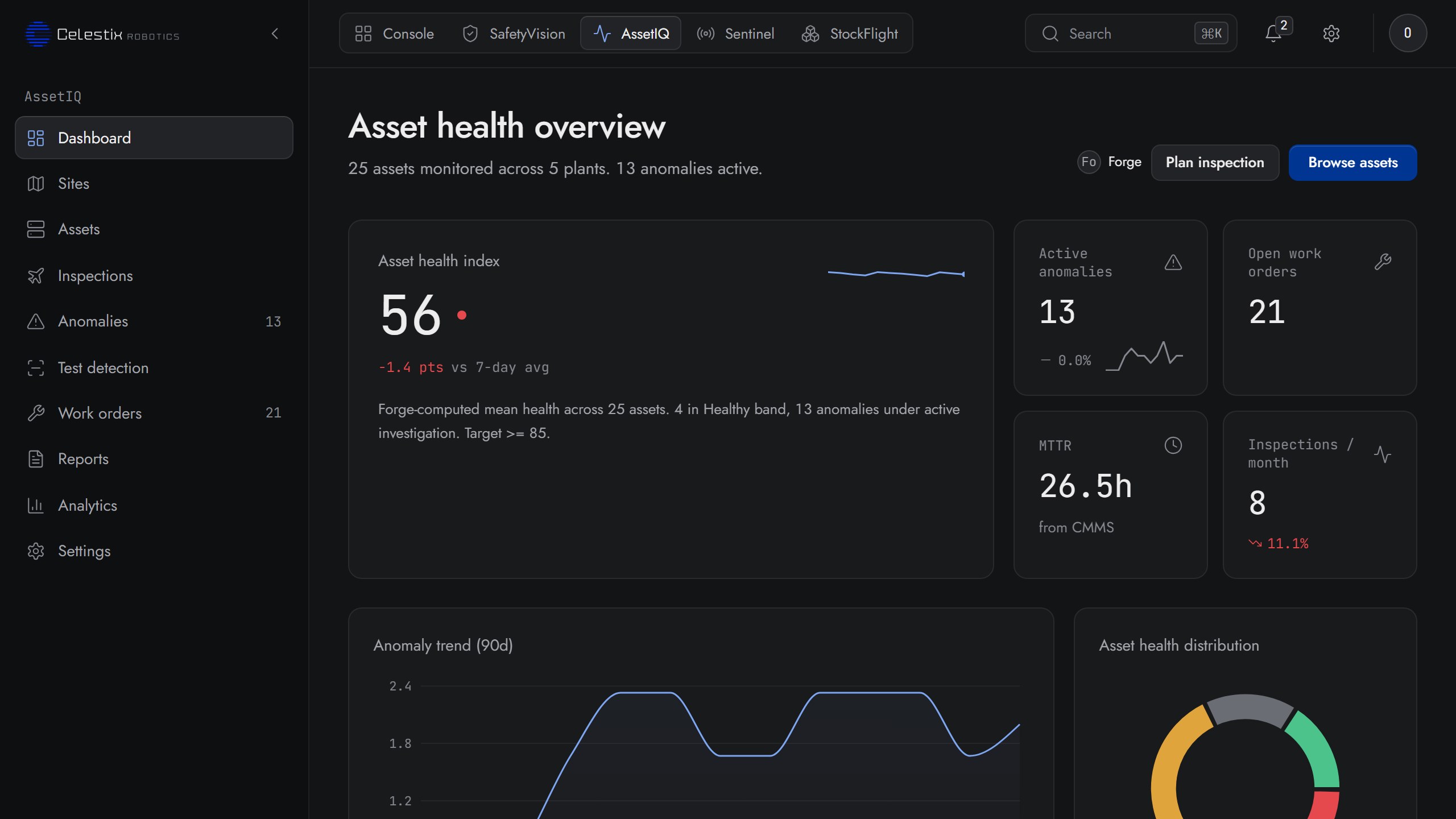
01 · Dashboard
Asset Health Overview, at a glance
Forge-computed mean health across every asset on every plant. Open work orders, active anomalies, MTTR from the CMMS and the inspection rate per month, all rolled into one operator landing page.
- Asset Health Index (0 to 100) with delta vs 7-day average
- Anomaly trend over 90 days, drillable by plant and zone
- Asset health distribution donut: healthy · watch · at risk · critical
- Plant cards with active-anomaly counts and one-click drill-down
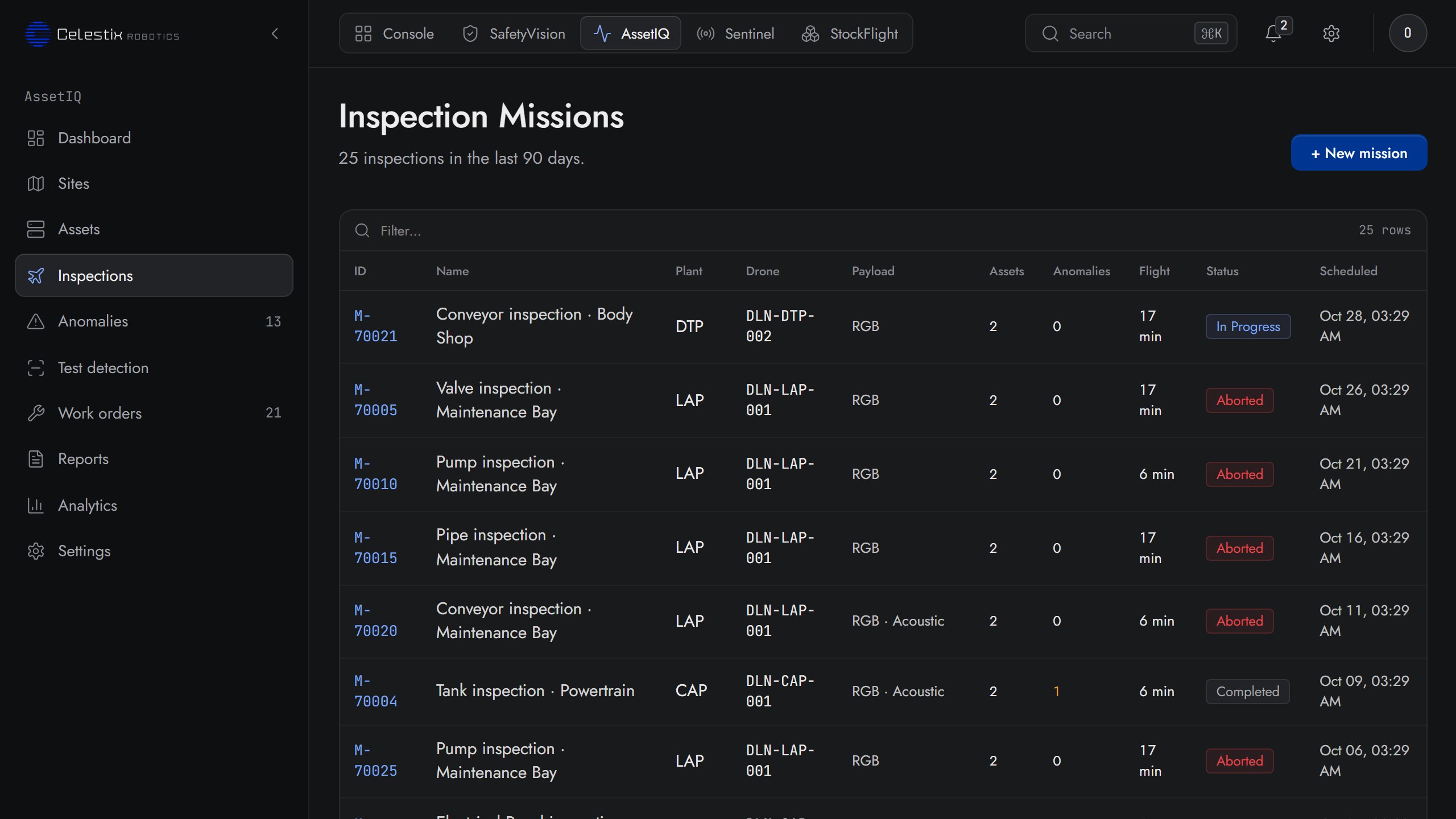
02 · Inspections
Every mission, every drone, every plant in one queue
All inspection missions across the fleet, filterable to the row. RGB or thermal, conveyor or valve, scheduled or aborted, the audit trail is one table, and any row opens to the frame range that justifies a finding.
- Mission · plant · drone · payload · asset count, all in one view
- Anomaly count per mission, scoped to that flight
- Status states: scheduled · in progress · completed · aborted
- New mission directly from this screen, no IT tickets
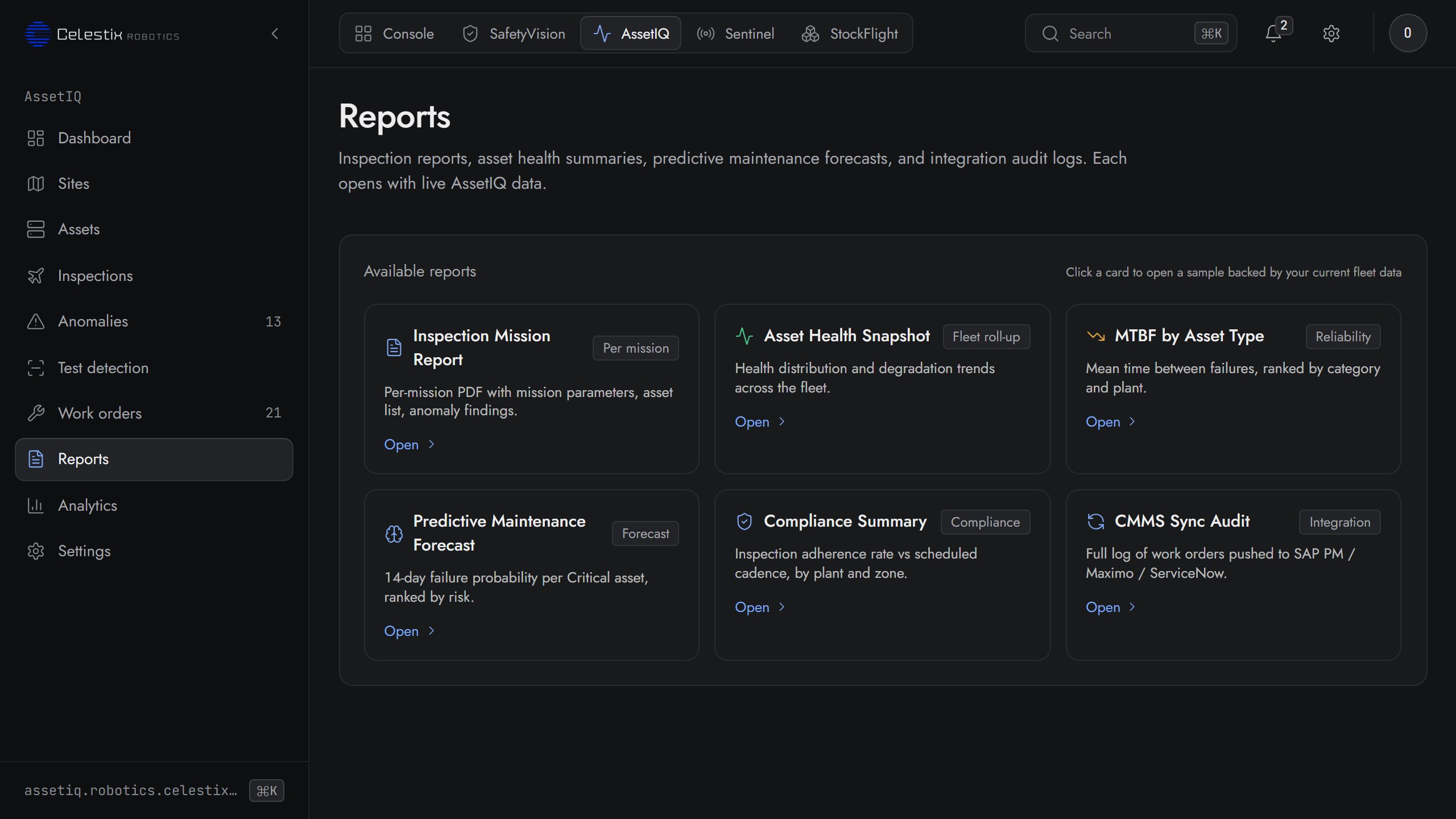
03 · Reports
Inspection PDFs and CMMS sync logs, on demand
Six report types ready by default: per-mission PDFs, fleet-wide health snapshots, MTBF by asset type, predictive forecasts, compliance summaries and the CMMS sync audit. Each card opens a sample backed by your current fleet data.
- Inspection mission report: per-mission PDF with parameters, asset list, findings
- Asset health snapshot and MTBF by asset type: fleet roll-up and reliability rank
- Predictive maintenance forecast: 14-day failure probability per critical asset
- CMMS sync audit: every work order pushed to SAP PM, Maximo or ServiceNow
The manual status quo
The bearing fails at 03:00. Nobody had a thermal pass at 02:00
Quarterly walkdowns. Wired sensors on a fraction of assets. The line goes down before the ticket goes in.
Status quo
Calendar and reactive
- Quarterly walkdowns, mostly day shift
- Wired sensors on a fraction of assets
- Findings live in notebooks and photos
- Work orders open after the failure
- Root-cause meetings, every time
AssetIQ
Predictive, every asset, every night
- Nightly RGB + thermal sweep
- No new wiring, no per-asset sensors
- Anomalies attach to the asset in CMMS
- Work order auto-filed at threshold
- Health Index trended per asset, per zone
Capabilities
Four anomaly classes, one workflow
Each finding is tagged with severity, asset, mission ID and the frame range that justifies the flag. Investigators get evidence, not a guess.
01 · Thermal
Hotspot detection
ΔT vs the asset's own baseline. Bearings, motors, panels, flagged before the temperature rules the room.
02 · Visual
Corrosion and leaks
RGB + IR fusion. Pipe, tank, skid, flange, valve, each scored against the prior pass.
03 · Electrical
Arcing in switchgear
Visual flicker detection on cabinets, busbars and panels. Critical findings escalate the work order.
04 · Automation
Auto-filed work orders
At threshold, AssetIQ opens a work order in ServiceNow, Maximo or SAP PM, with evidence and recommended craft attached.
Reported outcomes
Numbers reported by customers running AssetIQ
Annual savings
One early catch
Downtime avoided
Composition of savings
Reported by customers across live deployments. Under NDA: numbers yes, names never
Integrations
Drops into the CMMS your maintenance team already uses
Ready when you are
Book a demo of AssetIQ
We'll fly one zone, show the Health Index trend and walk through a real catch.