
The platform
One fleet. One console.
One plant model
Adding a job is software, not hardware. The same drone flies safety patrols, equipment inspections, security sweeps and pallet counts, coordinated by the same console and the same workforce registry.
The console · one mission, start to finish
The three layers
Hardware, console, applications, built by one team
Vertical integration is the moat. Every layer is owned, so every layer can be tuned.
01 · Hardware
The fleet
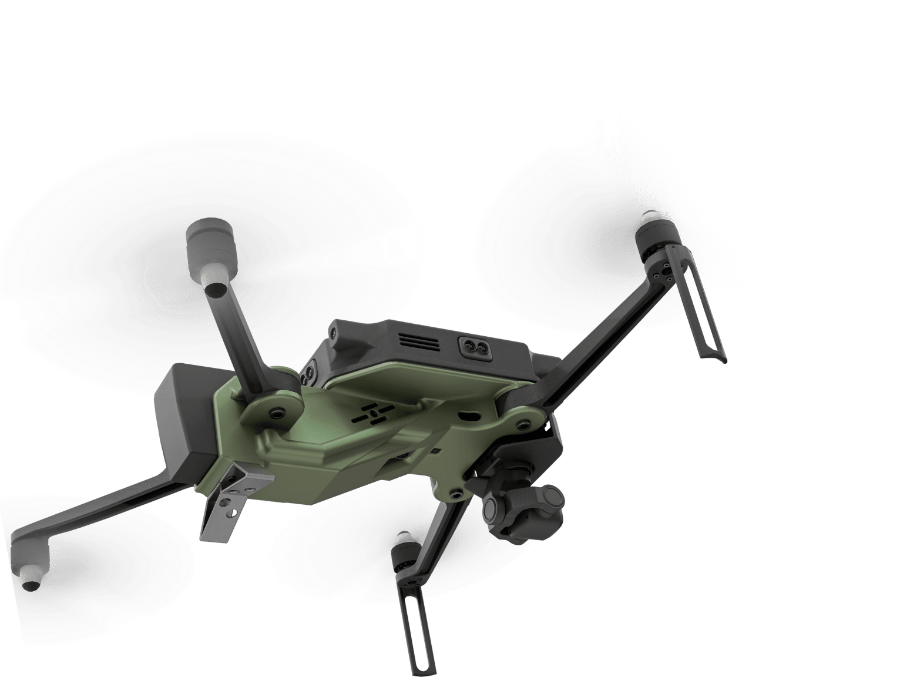
Foldable indoor drone, 1.8 kg, 45 km/h, ~20 min flight, autonomous dock. GPS-free indoor positioning via machine vision and laser rangefinders. Omnidirectional avoidance.
02 · Console
The console
One operator manages 1 to N sites. Mission planning, live monitoring, anomaly review, audit export. Workforce registry shared by all four products.
03 · Applications
The four jobs
SafetyVision, AssetIQ, Sentinel, StockFlight. Each is a software product on the same fleet, with no extra wiring and no extra hardware to procure.
Inside the console
One screen for the operator. Five surfaces, every shift
The console is where pilots and program managers actually live. Drones, overview, live wall, audit log and reports, with the same plant model underneath, the same workforce registry and the same auth.
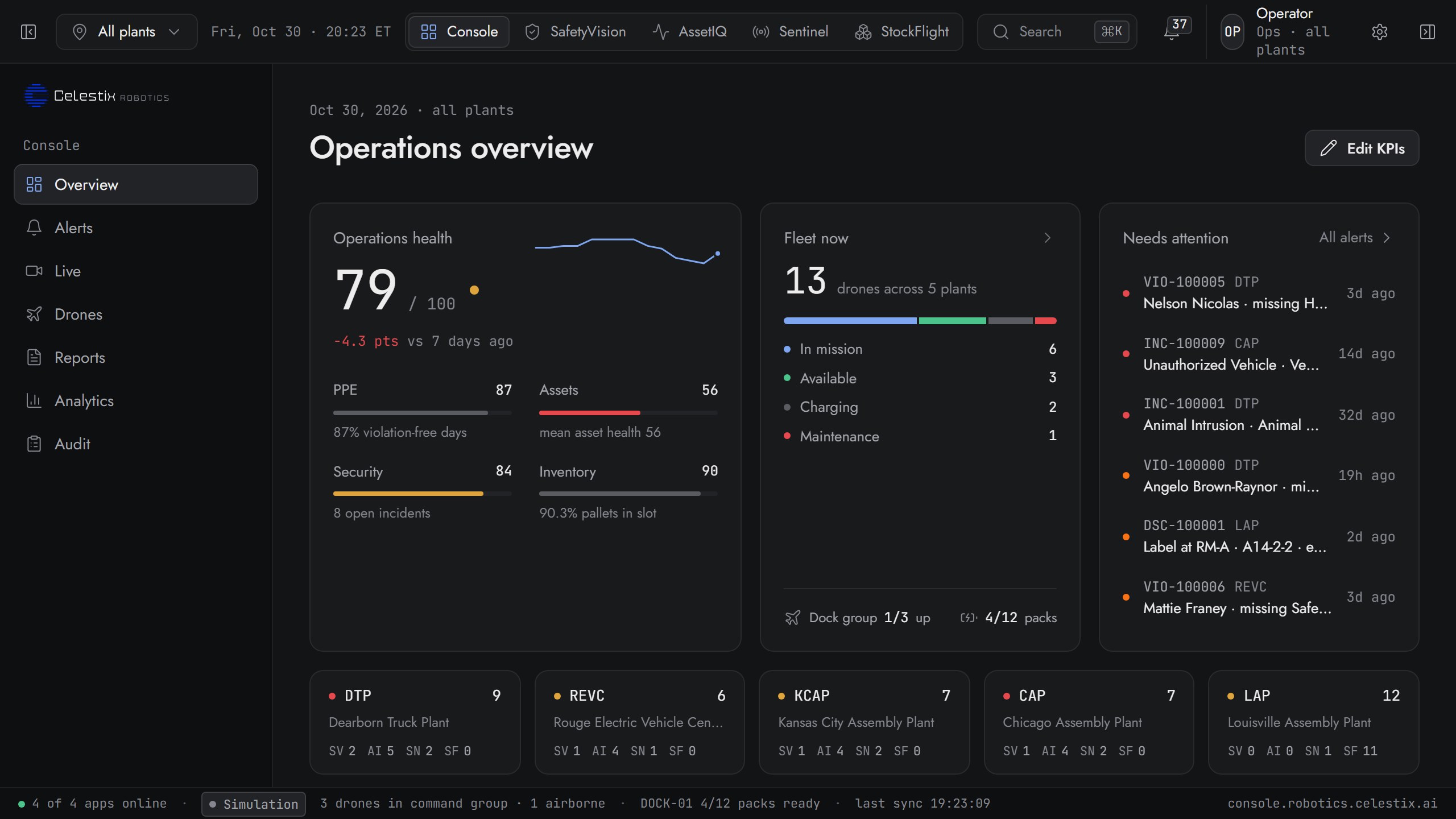
01 · Overview
Every plant, every app, on one operator screen
8 KPI tiles pull live numbers from SafetyVision, AssetIQ, Sentinel and StockFlight. Compliance trend, incidents by site, fleet utilization, all auto-refreshed via the status bar at the bottom.
- Active violations · open anomalies · open incidents · discrepancies
- Fleet status: 3 of 3 online · 2 in mission · 1 charging
- OSHA compliance · audit coverage · PPE detection, by product
- Recent events feed: last 8 across all 4 apps, one timeline
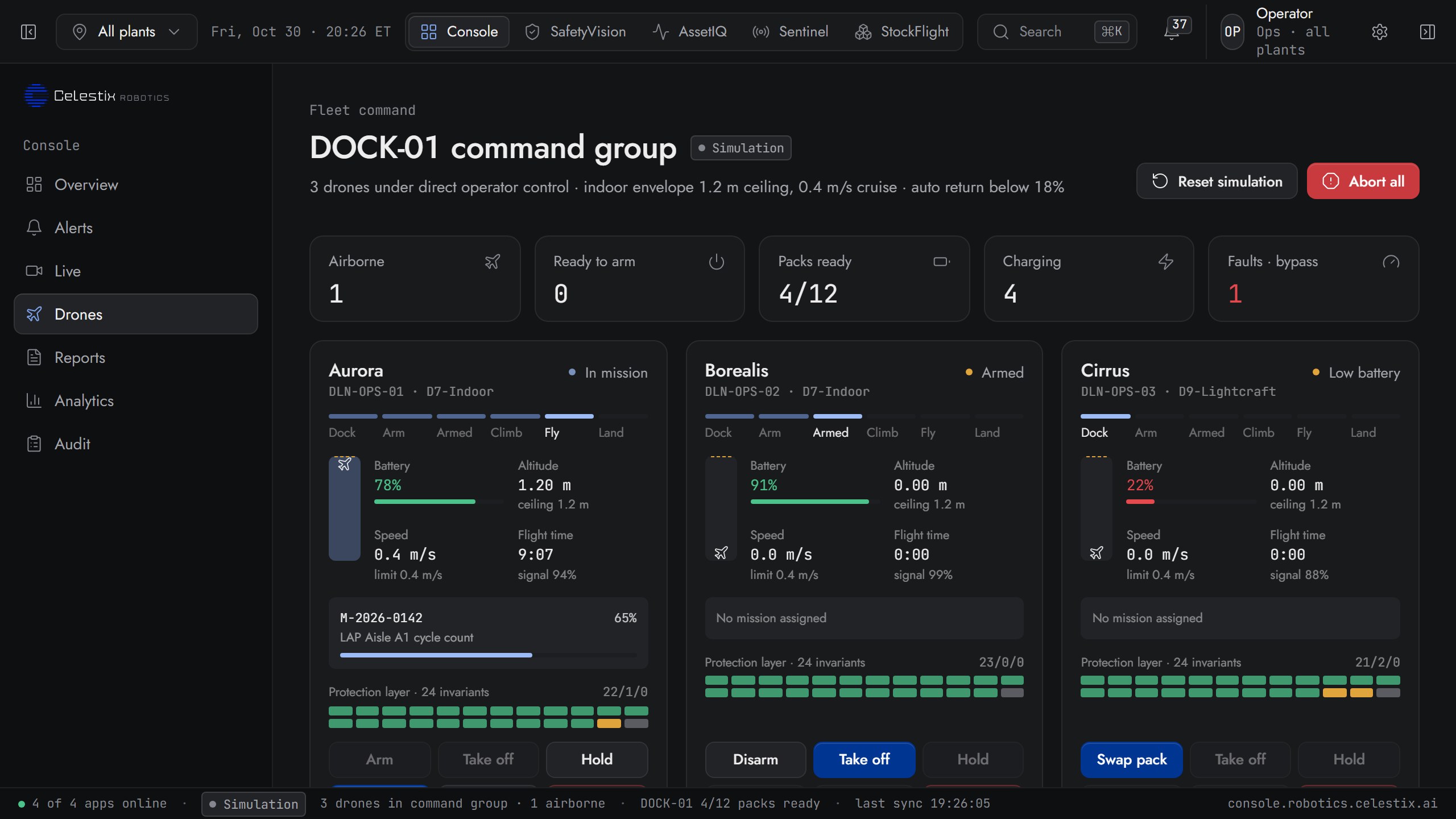
02 · Drones, fleet ops
13 drones across 5 plants. One dispatch panel
Per-drone status, battery, signal, altitude and mission state, plus an immediate abort-all force-land control. The fleet card below shows every drone grouped by plant, tagged with the vertical app consuming each patrol.
- Live state: armed · in mission · standby · available · returning · maintenance
- Module readiness grid: green · yellow · red, 24 modules per drone
- Per-drone manual controls: arm · take off · hover · RTH · land · abort
- Cross-plant view: 6 in mission · 3 available · grouped by plant and app
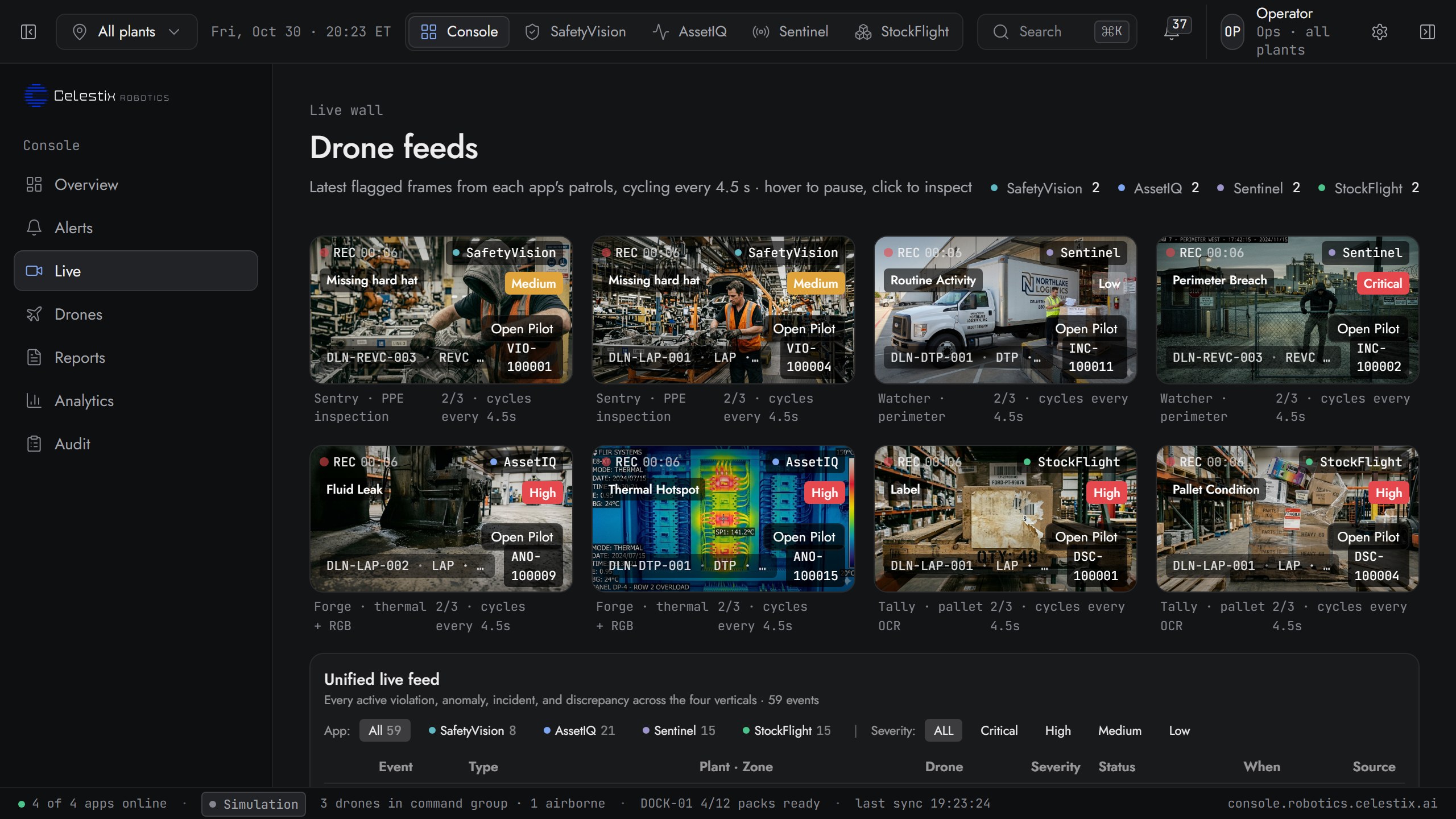
03 · Live wall
8 feature tiles and every active event in one feed
Each tile is a live frame from one of the four products with the active event called out, like missing PPE, a thermal hotspot, a perimeter breach or a broken pallet. The unified feed below lets one operator triage 100+ events without leaving the page.
- Tile per active event from SafetyVision · AssetIQ · Sentinel · StockFlight
- Severity filter: critical · high · medium · low, across all apps
- Per-event drone ID, zone, source app, timestamp, status
- Click any tile to drill into the Pilot AI conversation for that event
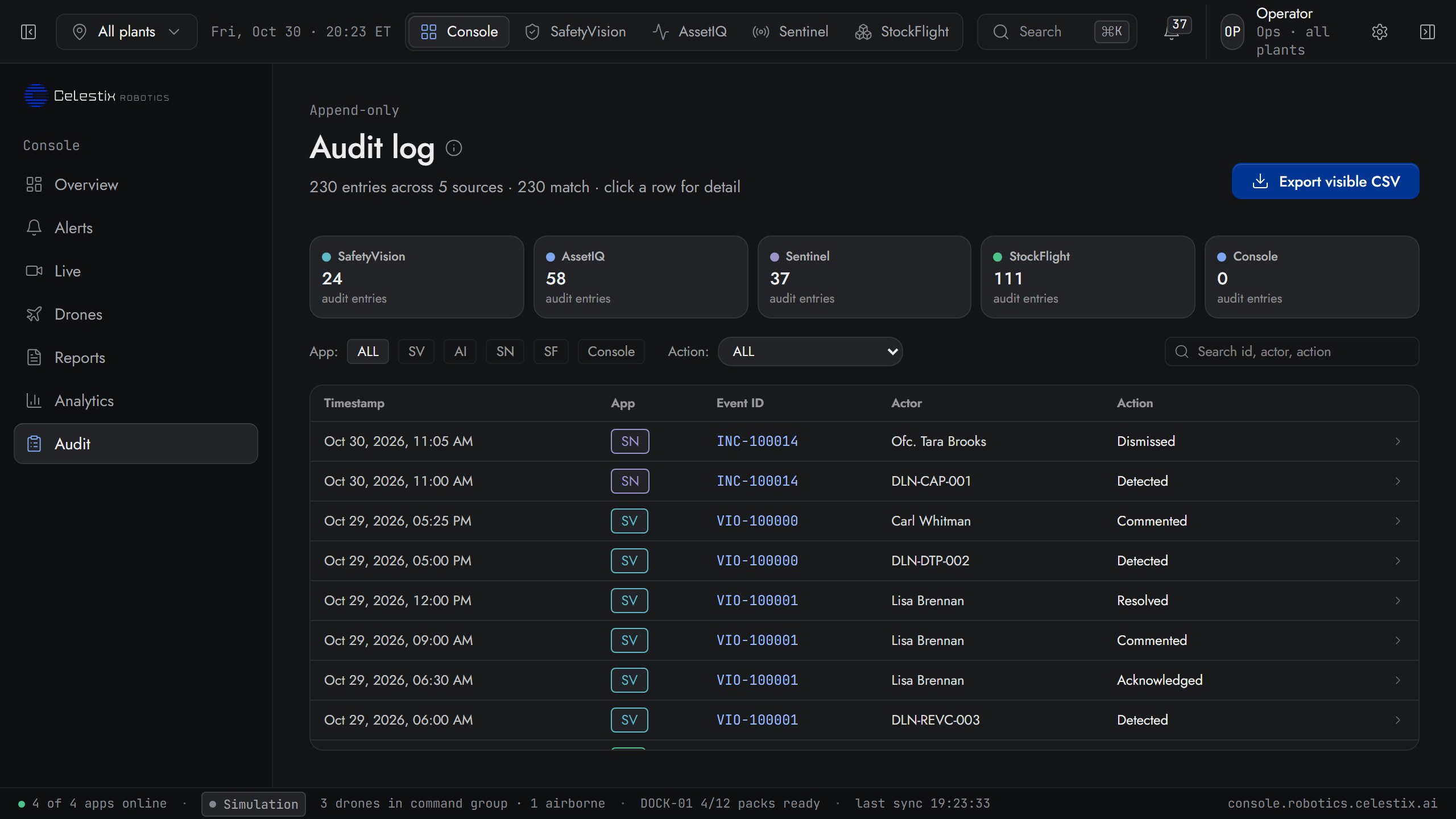
04 · Audit log
Every action, every operator, 90 days deep
Every event ID across all four apps, with the actor, the action and the timestamp. SafetyVision violations, AssetIQ resolutions, Sentinel dismissals, StockFlight comments: one log, one filter, one CSV export.
- Audit entries per app: SV · AI · SN · SF · Console
- Filter by app and action: detected · resolved · commented · dismissed
- Click any row for the full event detail with frame range
- Export visible CSV for legal, compliance and SOC 2 evidence
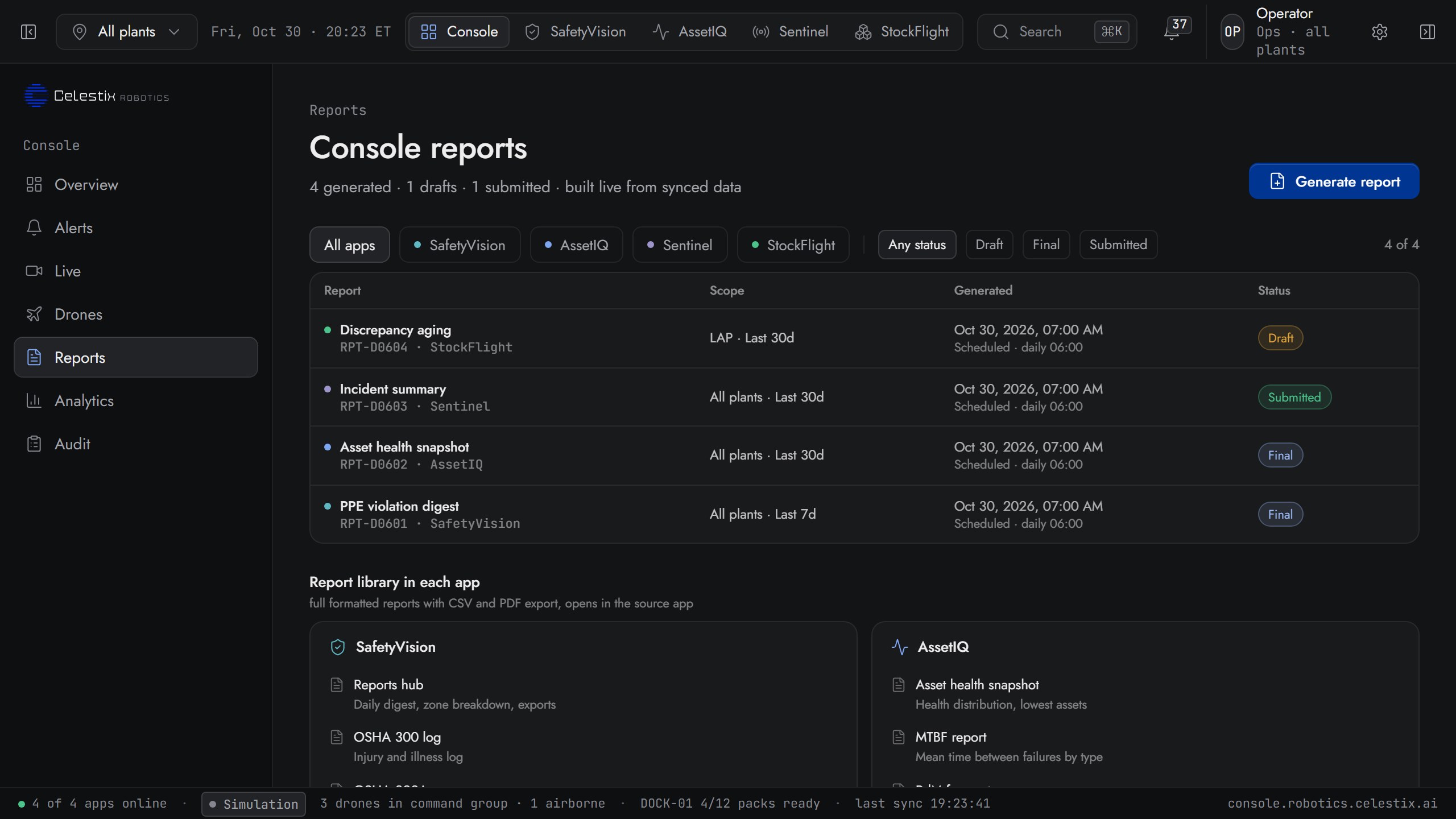
05 · Reports
16 live report templates across all four apps
Daily violation digest, OSHA 300/300A/301, asset health snapshot, CMMS sync audit, SLA performance, false alarm trend, insurance briefing, cycle-count summary, WMS sync audit: one library, every app, ready to send.
- 16 report templates · CSV and PDF export on each
- Drafts and final submitted reports queue, audit trail preserved
- Filter by app (SV · AI · SN · SF) and status (draft · final · submitted)
- Generate a new report in one click, no IT ticket
Built-in AI assistant
Ask the fleet what it saw last night
Console Assistant lives in the right rail of every page, scoped to the current plant and time window. Ask in natural language. It answers with the asset list, the frame range and a draft work order ready to file.
- Scope-aware“plant: ALL · last 24h · all apps”
- “How many critical violations today?”
- “Where is DLN-LAP-001 right now?”
- “Open work orders from this week's thermal sweeps”
- “Show the 7-day false-alarm trend at KCAP”
- “Generate the OSHA 300 form for May”
Asking about: ALL · last 24h · all apps
The hardware
Eight years of multirotor R&D. Built in the USA
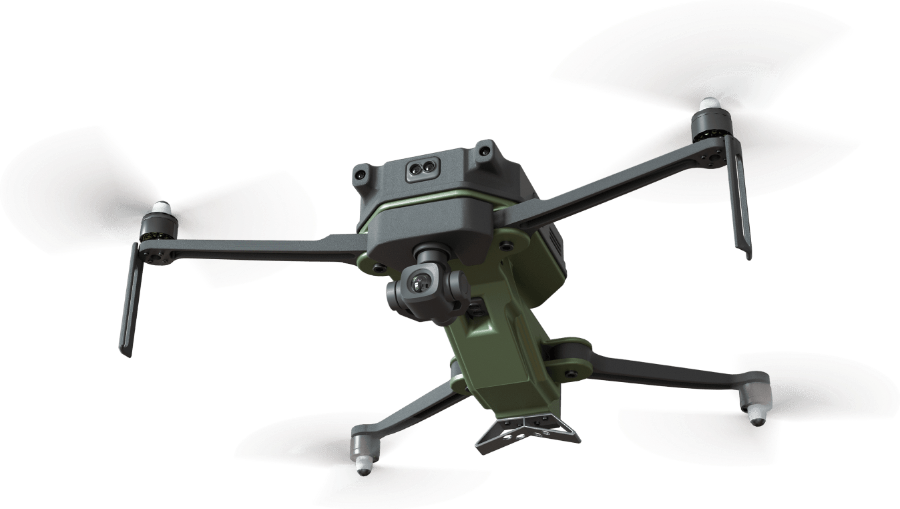
Spec sheet · v3
The autonomous dock
Take off. Patrol. Recharge. No human in the loop
The smart charging station handles takeoff, recharge and data transfer autonomously. Drones return on schedule or on trigger. The operator approves, doesn't fly.
- 01Take off from the dock
- 02Patrol, up to 20 minutes per cycle
- 03Return on schedule or on trigger
- 04Recharge or hot-swap, data transfer
Ready when you are
See the platform live
The fleet, the console, the AI assistant, in 30 minutes. Bring your hardest patrol.